💧 Water & Flow Monitoring Solutions

Water & Flow Monitoring Solutions

Track water flow, level, and quality across your infrastructure

Monitor water flow rates, tank levels, pressure, and quality parameters in real-time. Detect leaks, prevent overflow, and optimize water usage — fully compliant with CGWA groundwater telemetry norms.

The Problem

Challenges our customers face before implementing IoT monitoring.

💧

Undetected leaks

Underground leaks can waste thousands of liters daily. Without flow monitoring, they go unnoticed for months.

🚰

Tank overflow

Manual level checks are unreliable. Overflow wastes water and can cause structural damage.

📋

Compliance reporting

Water quality regulations require continuous monitoring and documentation. Manual testing doesn't cut it.

📡

Remote locations

Water treatment plants, borewells, and pumping stations are often in areas with no internet connectivity.

How It Works

Four steps from device to dashboard.

1

Connect

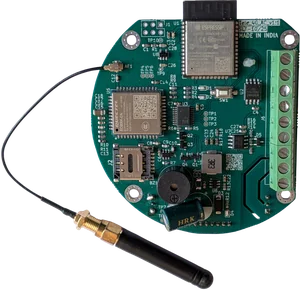
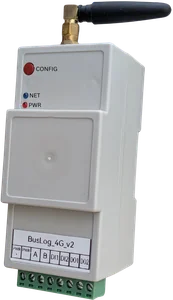
BusLog connects to flow meters (electromagnetic, ultrasonic), level sensors (ultrasonic, pressure), and quality analyzers via Modbus RTU. Flow Telemetry 4G module integrates directly inside compatible flow meters.

2

Transmit

Data pushed to cloud via 4G — perfect for remote borewells, treatment plants, and rural water supply.

3

Monitor

Live flow rates, cumulative consumption, tank levels, and quality parameters on a single dashboard.

4

Act

Automatic alerts for low levels, overflow, zero-flow (pump failure), and quality threshold breaches.

What You Can Monitor

Parameters available out of the box — plus any custom Modbus register.

Flow Rate (m³/hr, LPM) Cumulative Flow (m³) Water Level (m) Pressure (bar/psi) pH TDS Turbidity Chlorine residual Temperature Pump ON/OFF status

Use Cases

Real applications from our customers across India.

Municipal water supply monitoring
Industrial effluent flow tracking
Borewell pump & level monitoring
Cooling tower water management
Irrigation system automation
Water treatment plant SCADA

CGWA Compliance — Built In

Our devices and platform meet every requirement mandated by the Central Ground Water Authority (CGWA) for groundwater extraction telemetry.

As per CGWA guidelines, any industry or entity extracting more than 10 cubic meters of groundwater per day must install a digital flow meter with telemetry system within 90 days of receiving their NOC. Non-compliance attracts a penalty of ₹2,00,000.
Electromagnetic or ultrasonic flow meter
Works with all standard electromagnetic & ultrasonic Modbus flow meters (Krohne, Endress+Hauser, ABB, Accumax, and others)
Accuracy ±2% over 10-100% flow range
Reads meter-native accuracy values — no data loss or rounding in transmission
Cumulative forward, reverse & net flow volume
Reads all totalizer registers from the meter via Modbus RTU, transmitted with every data upload
Cumulative pump working hours
Tracked via digital input (pump ON/OFF) or read directly from meter registers
Meter serial number & borewell ID
Configured per device in the BusLog platform, included in every data payload
Minimum 2 transmissions per day
Configurable upload interval — from every 10 seconds to hourly. Default setup far exceeds the 2/day minimum
4G / GPRS / LAN connectivity
BusLog 4G and Flow Telemetry 4G support 4G LTE Cat-1 + Wi-Fi. Works in remote borewells with no LAN
Tamper detection & sealed enclosure
Power-off detection, communication loss alerts within 48 hours, and physical sealing provisions
Data stored locally for 2+ years
Internal memory buffers data during network loss. Cloud platform retains historical data per plan
Encrypted communication to secure cloud
TLS-encrypted MQTT/TCP communication to cloud hosted on secure infrastructure
Web portal with consumer, engineer & manager views
BusLog platform provides role-based dashboards — Viewer, Manager, and Admin access levels
Email/SMS alerts for anomalies
Configurable alerts for zero-flow, high-flow, reverse-flow, tamper, and communication loss

Ready to Start Monitoring Water?

Talk to our engineering team. We'll help you pick the right setup for your application.